Yes, AI customer service automation can deliver measurable time and cost savings for your SME — but only when you fix your processes before you touch the technology. That’s the core of Neurohain’s “Order First, Then AI” methodology, and it’s the difference between a pilot that sticks and one that quietly dies after six weeks.
The short version: AI-driven support can deflect 60–80% of repetitive questions when trained on existing content. Neurohain estimates that appointment-driven businesses can cut no-shows by up to 35% with automated confirmations and reminders (estimate for a typical business). Neither result happens without clean data and a mapped process underneath.
Two paths forward:
- DIY prototype: Index your site and PDFs with a single-snippet chatbot — live in minutes, zero developer required.
- Consultant-led: book a free 30-minute call with Neurohain, or ask for the free written audit, before committing to a full rollout.
Table of Contents
- What does AI customer service automation actually do for your SME?
- Who benefits most, and what kind of ROI should you expect?
- Is your data ready? What to prepare before you automate
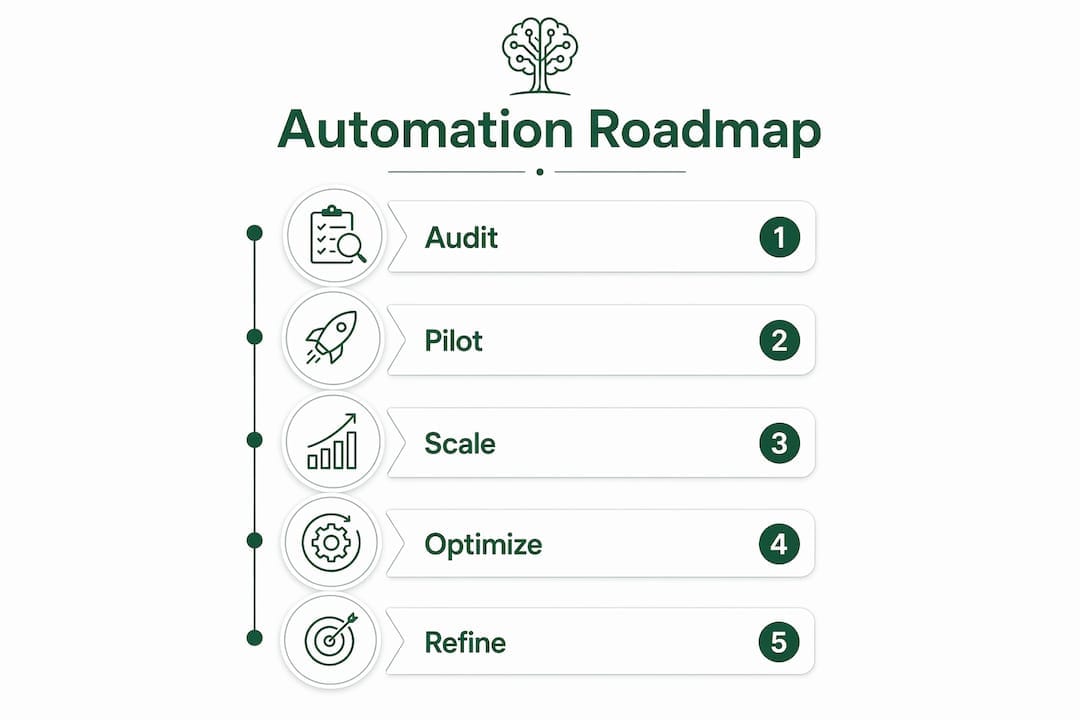
- What does a practical roadmap look like: audit, pilot, scale?
- Which KPIs actually tell you if it’s working?
- When should you hire a consultant instead of building in-house?
- Which five processes can you automate this week?
- What’s the right next step for your business this week?
- How do you connect AI to your existing platforms and CRM?
- Security and compliance considerations you can’t skip
- Change management: getting your team and customers on board
- Key Takeaways
- The part most guides won’t tell you
- Neurohain helps SMEs move from pilot to production
- Useful sources and further reading
What does AI customer service automation actually do for your SME?
Automated customer support is not just a chatbot answering FAQs. At the practical level, it covers six distinct capabilities:
- Knowledge-base indexing — the AI reads your docs, PDFs, and resolved tickets, then surfaces answers without a human in the loop.
- Web chat self-service — customers get instant answers on your site, 24/7, without waiting for business hours.
- Intent detection and intelligent routing — the system reads what the customer actually wants and sends them to the right agent or workflow. AI routing works behind the scenes, summarizing history and providing real-time guidance to human agents.
- Automated follow-ups and CRM updates — after a resolved ticket, the system logs the outcome, triggers a follow-up message, and updates the customer record without anyone touching a keyboard.
- Appointment confirmations and reminders — for service businesses, this is often the single highest-ROI automation.
- Basic troubleshooting flows — password resets, order status, billing lookups, return initiation.
The best automation is invisible. Customers should feel helped, not processed. Route and summarize rather than forcing users into rigid bot flows — the goal is a faster resolution, not a cheaper deflection.
A basic site-crawl chatbot can go live in minutes using one embed snippet. That’s your prototype. A production system with CRM sync, multi-agent routing, and policy enforcement takes longer — but you don’t need to start there.
Who benefits most, and what kind of ROI should you expect?
The SMEs that see the fastest returns share a common profile: high inquiry volume, repetitive question types, and at least one appointment or booking flow. Veterinary clinics, local service businesses and any practice where no-shows cost real money are natural fits.
Intelligent customer assistance works as a force multiplier, not a replacement. Your team stops answering the same five questions 40 times a week and starts handling the calls that actually need a human.
For veterinary practices, Neurohain estimates that VetFlow AI can cut no-shows by up to 35% (estimate for a typical clinic) — through automated appointment confirmations and WhatsApp reminders 24 hours and 2 hours before each visit, not by replacing front-desk staff.
For commerce and service sites, 60–80% of repetitive support questions — pricing, hours, shipping, returns — can be deflected when the AI is trained on existing content. That translates directly to fewer tickets, shorter queues, and faster response times for the issues that remain.

Is your data ready? What to prepare before you automate
The most common reason automation projects stall is not the technology. Fragmented or outdated knowledge bases are the primary constraint on AI effectiveness — the AI can only be as good as what you feed it.
Pre-automation readiness checklist:
- Centralize your knowledge base: merge docs, resolved tickets, and internal wikis into one accessible location.
- Consolidate CRM records: duplicate or incomplete customer records will produce wrong, personalized-sounding answers.
- Standardize FAQ wording: conflicting answers to the same question across different pages confuse the model.
- Map your top 10 support flows: document what triggers each request, what the correct answer is, and when to escalate.
- Define escalation rules: the AI needs to know when to hand off, not just when to answer.
Pro Tip: Run a one-week ticket audit before you build anything. Pull your last 200 support requests, tag them by type, and rank by volume. The top three categories are your pilot candidates — usually appointment confirmations, billing questions, or order status.
What does a practical roadmap look like: audit, pilot, scale?
| Stage | Timeframe | Effort | Risk | Expected Outcome |
|---|---|---|---|---|
| Audit | 1–2 weeks | Low | Low | Prioritized workflow list, KB gaps identified |
| Pilot | 2–6 weeks | Medium | Low–Medium | One workflow automated, baseline KPIs established |
| Scale | 1–6 months | High | Medium | Multi-agent routing, CRM/calendar integration, full governance |
Stage 1 — Audit (1–2 weeks):
- Pull ticket data and tag by category and volume.
- Audit your knowledge base for gaps, duplicates, and outdated content.
- Map the top candidate workflow end-to-end, including edge cases.
Stage 2 — Pilot (2–6 weeks):
- Pick one workflow. One. Not three.
- Deploy a prototype (site-crawl chatbot or a simple agent connected to your CRM via API).
- Measure resolution rate, re-contact rate, and CSAT for four weeks before expanding.
Stage 3 — Scale (1–6 months):
- Add multi-agent routing — a router agent classifies requests and delegates to specialized agents (billing, technical, account) to reduce errors and keep domain knowledge tight.
- Integrate with calendar, CRM, and billing systems via API or Model Context Protocol (MCP).
- Implement a policy engine with kill-switches and redaction safeguards for auditability.
Start with one workflow, validate outcomes, then scale. That sequence reduces risk and gives you clear ROI signals before you commit to full integrations.
Which KPIs actually tell you if it’s working?
Track confirmed resolution and re-contact rates, not just deflection. A ticket “deflected” by a bot that sends the customer back two hours later is not a win.
Primary KPIs:
- Confirmed resolution rate — did the customer’s issue actually get resolved without re-contact?
- Re-contact rate — what percentage of customers returned with the same issue within 48 hours?
- CSAT / NPS — are customers happier, or just faster to give up?
- Time-to-first-reply — how quickly does the first response reach the customer?
- Ticket deflection rate — useful as a volume metric, not a quality metric.
Operational KPIs:
- Reduction in manual follow-ups per week.
- CRM update rate (automated vs. manual).
- No-show rate for appointment-driven businesses.
For SME pilots, a reasonable target is a reduction in manual follow-up time and a confirmed resolution rate that indicates effective automation.
When should you hire a consultant instead of building in-house?
A DIY prototype makes sense when your data is clean, your workflow is simple, and you have someone technical enough to manage an embed script and review outputs weekly. That covers maybe 20% of SMEs.
Hire a consultant when: your data lives in three different systems, your industry has compliance requirements (healthcare, finance), you need multi-agent orchestration, or your first pilot failed and you’re not sure why.
Neurohain’s process-first approach — Order First, Then AI — starts with a process audit before any technology decision. That discovery phase is where most DIY projects skip steps and pay for it later. Neurohain’s products are VetFlow AI for veterinary clinics and LeadFlow AI for local service businesses, with n8n workflow templates to shorten time-to-value.
Which five processes can you automate this week?
- FAQ deflection on your website — index your site and top 20 FAQs with a single-snippet chatbot. Customers get instant answers; your team stops fielding the same calls. Simple embed, no integration required.
- Appointment confirmations and reminders — automated SMS or email sequences that confirm bookings and send reminders 24 hours before. Requires calendar integration; delivers the fastest measurable ROI for service businesses.
- Order and shipping status replies — connect your order management system to a chat agent that answers “where’s my order?” without a human. API integration needed; eliminates a high-volume, zero-value ticket type.
- Basic billing and receipt requests — automate invoice resends, payment confirmations, and receipt lookups. Light CRM integration; saves 15–30 minutes per day for most small teams.
- Post-resolution follow-ups — trigger an automated satisfaction survey and CRM update the moment a ticket closes. Single workflow; feeds your CSAT data automatically.
What’s the right next step for your business this week?
Automated customer support works when the process comes before the platform. If your knowledge base is fragmented, fix that first. If your top support flows are unmapped, map them before you buy anything.
Two paths, both valid: A DIY prototype costs you a few hours and tells you whether the concept fits your business. A consultant-led pilot costs more upfront but compresses the learning curve and avoids the architecture mistakes that cause rebuilds six months later.
DIY starter checklist:
- Export last 200 support tickets and tag by type.
- Consolidate FAQs into one document.
- Deploy a site-crawl chatbot with a one-line embed.
- Track resolution rate and re-contact rate for 4 weeks.
Consultant intake checklist:
- Prepare access to your CRM, ticketing system, and KB.
- Document your top 5 support flows with escalation rules.
- Define your success criteria before the first call.
- Book a free 30-minute call with Neurohain.
How do you connect AI to your existing platforms and CRM?
AI agents connect to CRM and ticketing systems via APIs or protocols like MCP to retrieve customer context in real time. That’s what separates a generic chatbot from a system that knows the customer’s order history, last ticket, and account status before it says a word.
For most SMEs, the practical integration sequence is: ticketing system first, then CRM, then calendar or billing. Each layer adds personalization and reduces the number of questions the customer has to answer twice. Your existing platforms — whether that’s a help desk, a scheduling tool, or a payment processor — don’t need to be replaced. They need to be connected.
Security and compliance considerations you can’t skip
A production-ready AI support system needs more than a privacy policy checkbox. Policy engines with kill-switches and redaction safeguards keep agents auditable and prevent the system from surfacing sensitive data it shouldn’t touch.
For U.S.-based SMEs, the relevant frameworks depend on your industry: HIPAA for healthcare, PCI-DSS for payment data, and state-level privacy laws like the California Consumer Privacy Act (CCPA) for businesses handling consumer data. Any AI system that touches customer records needs data minimization by design, clear retention policies, and a documented escalation path when the AI can’t resolve an issue safely.
Never deploy an AI agent with full autonomy over sensitive transactions — billing disputes, account closures, medical records — without a human approval step in the workflow.
Change management: getting your team and customers on board
The technology is rarely the hard part. Staff resistance and customer confusion are where most rollouts lose momentum.
Start with internal transparency: tell your team what the AI will handle, what it won’t, and how their role changes. Agents who understand that automation takes the repetitive load off them — not their jobs — adopt faster. Neurohain offers AI training for teams specifically designed for SME staff who are new to working alongside automated workflows.
For customers, the rule is simple: never hide the bot. Label it clearly, give it a name if you want, but make the escalation path to a human obvious and fast. Customers tolerate bots that are honest about their limits. They don’t tolerate bots that pretend to be human and then fail.
Key Takeaways
AI customer service automation delivers real ROI for SMEs when process design comes before technology selection, starting with one workflow and validating before scaling.
| Point | Details |
|---|---|
| Process before platform | Map your top support flows and centralize your knowledge base before deploying any AI tool. |
| Start with one workflow | Pilot a single use case (FAQ deflection or appointment reminders) for 4–6 weeks before expanding. |
| Measure what matters | Track confirmed resolution rate and re-contact rate, not just ticket deflection volume. |
| 60–80% deflection is achievable | AI trained on existing content can deflect 60–80% of repetitive questions for prepared SMEs. |
| Neurohain’s approach | Neurohain’s “Order First, Then AI” methodology maps and orders the process before any tool is chosen. |
The part most guides won’t tell you
The biggest mistake SMEs make with automated customer support isn’t picking the wrong tool. It’s treating automation as a cost-cutting exercise instead of a service design problem.
When the goal is “reduce headcount,” the AI gets deployed on top of broken processes, and it automates the frustration at scale. When the goal is “resolve the customer’s issue faster,” the design decisions change entirely. You map the flow first. You identify where the friction actually lives. You build the automation around the resolution, not around the deflection.
Fewer no-shows don’t come from a chatbot. They come from redesigning the confirmation and reminder workflow, then automating the redesigned version. The technology is the last decision, not the first.
Most vendors will sell you the tool and leave you to figure out the process. That’s where the gap lives — and it’s why process-first consulting produces outcomes that DIY deployments rarely match.
Neurohain helps SMEs move from pilot to production
Manual follow-up time drops when the workflow is designed before the tool is selected.
Neurohain has two products: VetFlow AI for veterinary clinics and LeadFlow AI for local service businesses focused on lead capture and follow-up. Every engagement starts with a process audit, not a software demo. Ready-made n8n workflow templates and AI playbooks shorten pilot timelines for teams that want to move fast without building from scratch.
Under Neurohain’s standard terms, a one-off setup fee is followed by a monthly fee from Go Live, with a 12-month minimum term. Prices: neurohain.com/en/servicios
To start, book a free 30-minute call with Neurohain. Bring your top 5 support flows and your current ticket volume. That’s enough to define a clear starting point.
Useful sources and further reading
| Source | What it supports |
|---|---|
| Automate Support | Prototype speed claims; 60–80% deflection statistics; one-line embed setup |
| Dust Blog — AI Support Agents | Multi-agent architecture; data readiness failure modes; CRM/API integration guidance |
| Zendesk — Automated Customer Service | Resolution-first KPI framework; routing and agent-assist best practices |
| Genesys — Automated Customer Support | Automation as force multiplier; human-AI collaboration framing |
| Duckie — AI Support Agents | Policy engines; kill-switches; post-support CRM automation |
| Neurohain Services | Order First, Then AI methodology; products, prices and templates |
Recommended
- Servicios de IA — Automatización y Consultoría | Neurohain
- Templates — n8n Workflows & AI Playbooks | Neurohain
The discussion in “AI Customer Service Automation for SMEs: Roadmap & Quick Wins – Neurohain” is clear and useful. The supporting details make the main points much easier to understand.